AMD Radeon HD 7850 & HD 7870 2 GB [ TechPowerUP ] [ Partial ]
This Is Just Partial Page From The ORIGINAL Source

Visit the original website for the complete review, http://www.techpowerup.com/reviews/AMD/HD_7850_HD_7870/

"Next-generation", "Graphics CoreNext", "Radeon HD 7000 series", "Southern Islands"...this is it. AMD's new GPU architecture has moved into the phase where its makers launch serious money-making products based on it, with the Radeon HD 7800 series.

Targeting a wide price-range between $250-$350, the HD 7800 series falls into the market-segment both AMD and NVIDIA have known to refer to as the "sweetspot" segment. When people decide to turn their $400 Dell desktops into gaming PCs, instead of buying $300 game consoles for their TV, it's graphics cards from this segment that they end up buying. Smooth gameplay at full-HD resolution is a requisite.
AMD has to get several things right about the products it's launching today, because the competitiveness of the entire HD 7000 series hangs on its success. First, it needs to create a sizable performance jump, over the previous-generation Radeon HD 6800 series; second, its new chip has to prove Graphics CoreNext as being a viable investment for AMD by meeting some basic cost/performance, performance/die-area, and performance/Watt figures. VLIW4 had a very short stint before Graphics CoreNext.

NVIDIA hasn't even started with its next-generation GPU lineup, leaving its previous-generation to defend itself against a reinvigorated AMD lineup. AMD appears to have exploited this late-coming by NVIDIA. The launch prices of Radeon HD 7900 series resembled those of NVIDIA's high-end GTX series, the Radeon HD 7700 series products ask a couple of dozen Dollars too many. AMD kept the theme going with the Radeon HD 7800 series. You may recollect AMD's Radeon HD 6870 shipping for $240 on launch, and the HD 6850 for $180, both very attractive prices. The slide above is every indication of AMD trying to justify launch prices of $349 for the HD 7870 and $249 for the HD 7850, just because they are touted to outperform whatever NVIDIA currently has in those price-ranges (we're going to find that out in this review).
Architecture
The Radeon HD 7800 series consists of two models, the Radeon HD 7870, and the Radeon HD 7850, both stretched far apart in the market segment. The two are based on AMD's brand new GPU, codenamed "Pitcairn". Built on the 28 nm fabrication process, this new chip holds 2.8 billion transistors. "Pitcairn" is a 100% upscale of the "Cape Verde" silicon, on which the Radeon HD 7700 series is based. It has 1280 Graphics CoreNext stream processors, arranged in 20 Graphics CoreNext Compute Units (GCN CUs). The component hierachy of "Pitcairn" resembles that of "Tahiti", more than it does "Cape Verde". The 20 GCN CUs are arranged in two clusters, with two sets of geometry processing engines, and rasterizers, handing the initial stages of graphics processing.

Apart from 1280 stream processors, Pitcairn has 80 Texture Memory Units (TMUs), 32 ROPs (Raster Operations), and a 256-bit wide GDDR5 memory interface, holding 2 GB of memory. Here's something interesting. AMD deemed 2 GB as the new standard memory amount for performance-segment graphics cards. Both the HD 7870 and HD 7850 have 2 GB of memory, clocked at 1200 MHz (4.80 GHz GDDR5 effective), churning out 153.6 GB/s memory bandwidth. As for the core clock, the HD 7870 has its core clocked at 1000 MHz, making it AMD's second "GHz Edition" SKU after the HD 7770; while the HD 7850 has its core clocked at 860 MHz. The Radeon HD 7850 is carved out by disabling four GCN CUs, leaving 1024 stream processors, and 64 TMUs. The rest of the SKU is identical to the HD 7870.
In this review, we are evaluating both the Radeon HD 7870 and the Radeon HD 7850. Both cards are AMD reference design samples provided by the company.
Packaging
We received only the cards from AMD, without packaging or accessories. The included accessories with retail boards will match today's standard.
The Cards


The card requires two slots in your system.

Display connectivity options include one DVI port, one full size HDMI port and two mini-DisplayPorts. You may use all the outputs at the same time, thanks to AMD's superior display output architecture.
An HDMI sound device is included in the GPU, too. It is HDMI 1.4a compatible which includes HD audio and support for Blu-ray 3D movies. The DisplayPort outputs are version 1.2 which enables the use of hubs and Multi-Stream transport.


AMD's heatsink uses a central copper copper core and heatpipes to keep their card cool. You can also see the white pads that transport heat away from the memory chips.


The HD 7870 requires two 6-pin PCI-Express power cables for operation, whereas there is only one 6-pin on the HD 7850. This power configuration is good for up to 225 W of power draw for the former and 150 W for the latter.

For voltage control both cards use the CHil CHL8225 controller, which is essentially the same as the CHL 8228 that's used on many high-end cards. It does offer extensive software voltage control and monitoring features and is well-supported by most overclocking software.
Retail HD 7850 boards will likely feature a lower cost voltage controller, like NCP5395 which has no software voltage control.

The GDDR5 memory chips are made by Hynix, and carry the model number H5GQ2H24MFR-T2C. They are specified to run at 1250 MHz (5000 MHz GDDR5 effective).


AMD's new Pitcairn graphics processor completes the AMD 28 nm GPU stack. It is produced on a 28 nm process at TSMC, with a transistor count of 2.8 billion. (HD 7850 GPU in the 2nd picture).
Benchmark scores in other reviews are only comparable when this exact same configuration is used.

Aliens vs. Predator is based on a merger of the Aliens and the Predators franchise: two legendary alien species that are in conflict with each other, fighting to the death with human marines caught in between. The first person shooter game was developed by Rebellion Studios, who also developed the first AVP PC title and released in February 2010. It is one of the first DirectX 11 games with support for new features like tesselation, which is why AMD heavily promoted it at the time of their DX 11 card launches. We use the AVP benchmark utility with tesselation and advanced DX11 shadows enabled.


Batman is back on the LCD screen with Arkham City, a sequel to Batman: Arkham Asylum, by Rocksteady Games and WB. It was released to the PC platform in November. Batman is imprisoned in Arkham City, an infamous district of the DC Universe that contains the scum of Gotham, most of which Batman helped get in there. In order to get out he must go through scores of baddies, and encounter many of the iconic super-villains along the way. He's not entirely alone.
Batman Arkham City uses the same Unreal Engine by Epic, as Arkham Asylum, but thanks to the engine's modularity, it has been overhauled, outfitted with the latest technologies, including a graphics engine that takes advantage of DirectX 11.


Arguably the most anticipated online shooter title among real gamers - PC gamers, Battlefield 3 is the latest addition to some of the most engaging online multi-player shooter franchises. It combines infantry combat with mechanized warfare including transport vehicles, armored personnel carriers, main battle tanks, attack helicopters, combat aircraft, pretty much everything that goes into today's battlefields. The infantry combat is coupled with role-playing elements, which makes the experience all the more engaging. It also has a single-player campaign which added a few gigabytes to its installer.
Behind all this is a spanking new game engine by EA-DICE, Frostbite 2. It makes use of every possible feature DirectX 11 has to offer, including hardware tessellation, and new lighting effects, to deliver some of the most captivating visuals gamers ever had access to. Not playing this game on PC is grave injustice to what's in store. Faster PCs are rewarded with better visuals.


Developed by Flying Wild Hog, a studio that prides itself with the fact that its creation is PC-exclusive (bless them), Hard Reset is a first person shooter that's set in a future cyberpunk setting of a dystopian world. It reintroduces many of the gameplay mechanics that made classics such as Quake wicked fun, which today's tactical military shooters eroded, creating a 'void' for.
The game uses the studio's in-house Road Hog Engine, which isn't particularly heavy on new-generation DirectX features, but can still get taxing with some GPUs.


Set in 16th century feudal Japan, Total War: Shogun 2 takes the player on a quest for domination to conquer and unite the warlords of Japan. Moving away from the European setting of previous Total War games, the game is now designed around principles of the brilliant Chinese general Sun Tzu and his book "The Art of War". Gameplay is switched between real-time battles during which units on the battlefield are controlled and turn-based strategy which enable diplomacy, economy and production management. Taking control of a castles is comprised of several different stages which adds more complexity to warfare.
We benchmark using the highest settings in DirectX 11 mode, which was added via patch after release.


This isn't just a game, it's a masterpiece. A very large sandbox game that rejects the quality-quantity inverse-proportionality. By genre a role-playing game, TES: Skyrim combines some of the best elements of older titles in the franchise, with some new sandbox elements to churn out an extremely engaging, and addictive game. It makes use of Bethesda's Creation Engine, which isn't visually-intensive in that it doesn't use taxing graphics features, but the game's presentation itself, with large open worlds, end up taxing your hardware. Faster GPUs result in smoother gameplay with most eyecandy turned on.


3DMark 11 is the very latest from the house of Futuremark, which has given out some of the most comprehensive benchmark applications for PC enthusiasts and gamers. 3DMark 11, as the name might probably suggest, makes use of Microsoft DirectX 11 API, and puts every feature at its disposal to use, creating astonishingly-realistic visuals. In the process, it evaluates DirectX 11 compliant GPUs, and lets gamers know what to expect from games from the near future that make use of the API, in terms of visual realism. The tessellation and depth of field tests are particularly of interest here.


Unigine Heaven was one of the first demos that supported DirectX 11. Heaven is a technology demonstration for Unigine engine which supports DirectX 9 through 11 and OpenGL too. Version 2.0 adds more scenes and optionally more complex tesselation features. While there is some controversy surrounding the benchmark whether it is an accurate representation of what to expect from future games in regards to DirectX 11 we still chose it as test to get an insight into potential future gaming.


For this test we measure power consumption of only the graphics card, via PCI-Express power connector(s) and PCI-Express bus slot. A Keithley Integra 2700 with 6.5 digits is used for all measurements. Again, the values here reflect card only power consumption measured at DC VGA card inputs, not the whole system.
We chose Crysis 2 as a standard test representing typical 3D gaming usage because it offers: - very high power draw - high repeatability - is a current game that is supported on all cards due to its DirectX 9 nature - drivers are actively tested and optimized for it - supports all multi-GPU configurations - test runs a relatively short time and renders a non-static scene with variable complexity.
Our results are based on the following tests:
In 3D, the power consumption is roughly identical when comparing absolute power draw numbers. Taking into account the increased 3D performance of the HD 7800 Series, results in leading performance per Watt scores. Only AMD's HD 7750 is more efficient, but also much slower.
Furmark maximum power has gone down since AMD has put their PowerTune technology in the cards, which detects overload situations and reduces performance accordingly to keep power consumption in check.
A new feature of the HD 7000 Series is AMD ZeroCore Power, which will power off the card as soon as the monitor output is blanked, during screen saver for example. For additional power and noise reduction the fan will stop in this state, too. We measured a power consumption of 1.11 Watts for the whole graphics card during ZeroCore Power. As soon as you move the mouse the PC is back immediately, there is no lag or any delay.
Please note that ZeroCore Power seems to engage only when the screen is completely static. If you have an application running that draws to the screen, the monitor will go black, but the card will not enter the low power state or return from it quickly. To avoid this, minimize all applications and let Windows sit at the desktop.


In order to properly test the fan noise a card emits we are using a Bruel & Kjaer 2236 sound level meter (~$4,000) which has the measurement range and accuracy we are looking for.


The tested graphics card is installed in a system that is completely passively cooled. That is passive PSU, passive CPU cooler, passive cooling on the motherboard and a solid state drive.
This setup allows us to eliminate secondary noise sources and test only the video card. To be more compliant with standards like DIN 45635 (we are not claiming to be fully DIN 45635 certified) the measurement is conducted at 100 cm distance and 160 cm over the floor. The ambient background noise level in the room is well below 20 dbA for all measurements. Please note that the dbA scale is not linear, it is logarithmic. 40 dbA is not twice as loud as 20 dbA. A 3 dbA increase results in double the sound pressure. The human hearing is a bit different and it is generally accepted that a 10 dbA increase doubles the perceived sound level. The 3D load noise levels are tested with a stressful game, not Furmark.
Noise levels are far from impressive. I would have expected much better, especially in idle, considering the reduced heat outputs of the new cards.
Under load, noise is similar to what we have seen from previous generation cards - no significant improvements here either.
Generally AMD reference design cards have more noisy coolers than custom AIB designs, so there is still some hope.


HD 7870 (1st picture): Maximum stable clocks of the card are 1205 MHz core (21% overclock) and 1520 MHz Memory (27% overclock).
Outstanding results! 1205 MHz GPU clock is actually the highest clock we have seen on any graphics card tested so far. Memory overclock well, too, to the typical levels for these chips.
The HD 7850 overclocks a bit worse than the HD 7870 in terms of maximum clock speed, but that is to be expected from a lower-grade GPU. Maximum clocks are 1140 MHz (+33%) and 1580 MHz (+32%).

Actual 3D performance gained from overclocking is 18.7% (HD 7850) and 18.5% (HD 7870).

Temperatures are low, I would have preferred less noise for slightly higher temperatures.
The following table lists the clock settings for important performance scenarios and the GPU voltage that we measured. We measure on the pins of a coil or capacitor near the GPU voltage regulator.

Visit the original website for the complete review, http://www.techpowerup.com/reviews/AMD/HD_7850_HD_7870/
"Next-generation", "Graphics CoreNext", "Radeon HD 7000 series", "Southern Islands"...this is it. AMD's new GPU architecture has moved into the phase where its makers launch serious money-making products based on it, with the Radeon HD 7800 series.
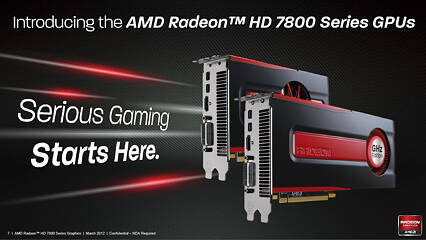
Targeting a wide price-range between $250-$350, the HD 7800 series falls into the market-segment both AMD and NVIDIA have known to refer to as the "sweetspot" segment. When people decide to turn their $400 Dell desktops into gaming PCs, instead of buying $300 game consoles for their TV, it's graphics cards from this segment that they end up buying. Smooth gameplay at full-HD resolution is a requisite.
AMD has to get several things right about the products it's launching today, because the competitiveness of the entire HD 7000 series hangs on its success. First, it needs to create a sizable performance jump, over the previous-generation Radeon HD 6800 series; second, its new chip has to prove Graphics CoreNext as being a viable investment for AMD by meeting some basic cost/performance, performance/die-area, and performance/Watt figures. VLIW4 had a very short stint before Graphics CoreNext.

NVIDIA hasn't even started with its next-generation GPU lineup, leaving its previous-generation to defend itself against a reinvigorated AMD lineup. AMD appears to have exploited this late-coming by NVIDIA. The launch prices of Radeon HD 7900 series resembled those of NVIDIA's high-end GTX series, the Radeon HD 7700 series products ask a couple of dozen Dollars too many. AMD kept the theme going with the Radeon HD 7800 series. You may recollect AMD's Radeon HD 6870 shipping for $240 on launch, and the HD 6850 for $180, both very attractive prices. The slide above is every indication of AMD trying to justify launch prices of $349 for the HD 7870 and $249 for the HD 7850, just because they are touted to outperform whatever NVIDIA currently has in those price-ranges (we're going to find that out in this review).
Architecture
The Radeon HD 7800 series consists of two models, the Radeon HD 7870, and the Radeon HD 7850, both stretched far apart in the market segment. The two are based on AMD's brand new GPU, codenamed "Pitcairn". Built on the 28 nm fabrication process, this new chip holds 2.8 billion transistors. "Pitcairn" is a 100% upscale of the "Cape Verde" silicon, on which the Radeon HD 7700 series is based. It has 1280 Graphics CoreNext stream processors, arranged in 20 Graphics CoreNext Compute Units (GCN CUs). The component hierachy of "Pitcairn" resembles that of "Tahiti", more than it does "Cape Verde". The 20 GCN CUs are arranged in two clusters, with two sets of geometry processing engines, and rasterizers, handing the initial stages of graphics processing.

Apart from 1280 stream processors, Pitcairn has 80 Texture Memory Units (TMUs), 32 ROPs (Raster Operations), and a 256-bit wide GDDR5 memory interface, holding 2 GB of memory. Here's something interesting. AMD deemed 2 GB as the new standard memory amount for performance-segment graphics cards. Both the HD 7870 and HD 7850 have 2 GB of memory, clocked at 1200 MHz (4.80 GHz GDDR5 effective), churning out 153.6 GB/s memory bandwidth. As for the core clock, the HD 7870 has its core clocked at 1000 MHz, making it AMD's second "GHz Edition" SKU after the HD 7770; while the HD 7850 has its core clocked at 860 MHz. The Radeon HD 7850 is carved out by disabling four GCN CUs, leaving 1024 stream processors, and 64 TMUs. The rest of the SKU is identical to the HD 7870.
In this review, we are evaluating both the Radeon HD 7870 and the Radeon HD 7850. Both cards are AMD reference design samples provided by the company.
| Radeon HD 6870 | Radeon HD 7770 | GeForce GTX 560 Ti | Radeon HD 6950 | GeForce GTX 570 | Radeon HD 6970 | Radeon HD 7850 | Radeon HD 7870 | GeForce GTX 580 | Radeon HD 7950 | Radeon HD 7970 | |
|---|---|---|---|---|---|---|---|---|---|---|---|
| Shader Units | 1120 | 640 | 384 | 1408 | 480 | 1536 | 1024 | 1280 | 512 | 1792 | 2048 |
| ROPs | 32 | 16 | 32 | 32 | 40 | 32 | 32 | 32 | 48 | 32 | 32 |
| Graphics Processor | Barts | Cape Verde | GF114 | Cayman | GF110 | Cayman | Pitcairn | Pitcairn | GF110 | Tahiti | Tahiti |
| Transistors | 1700M | 1500M | 1950M | 2640M | 3000M | 2640M | 2800M | 2800M | 3000M | 4310M | 4310M |
| Memory Size | 1024 MB | 1024 MB | 1024 MB | 2048 MB | 1280 MB | 2048 MB | 2048 MB | 2048 MB | 1536 MB | 3072 MB | 3072 MB |
| Memory Bus Width | 256 bit | 128 bit | 256 bit | 256 bit | 320 bit | 256 bit | 256 bit | 256 bit | 384 bit | 384 bit | 384 bit |
| Core Clock | 900 MHz | 1000 MHz | 823 MHz | 800 MHz | 732 MHz | 880 MHz | 860 MHz | 1000 MHz | 772 MHz | 800 MHz | 925 MHz |
| Memory Clock | 1050 MHz | 1125 MHz | 1002 MHz | 1250 MHz | 950 MHz | 1375 MHz | 1200 MHz | 1200 MHz | 1002 MHz | 1250 MHz | 1375 MHz |
| Price | $155 | $160 | $210 | $240 | $330 | $340 | $250 | $350 | $475 | $450 | $560 |
Packaging
We received only the cards from AMD, without packaging or accessories. The included accessories with retail boards will match today's standard.
The Cards


The card requires two slots in your system.
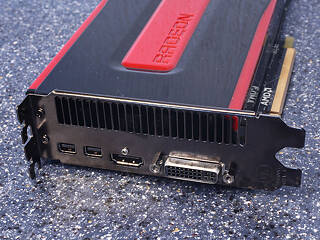
Display connectivity options include one DVI port, one full size HDMI port and two mini-DisplayPorts. You may use all the outputs at the same time, thanks to AMD's superior display output architecture.
An HDMI sound device is included in the GPU, too. It is HDMI 1.4a compatible which includes HD audio and support for Blu-ray 3D movies. The DisplayPort outputs are version 1.2 which enables the use of hubs and Multi-Stream transport.

You may combine up to two HD 7850/HD7870 cards from any vendor in a multi-GPU CrossFire configuration for higher framerates or better image quality settings.


Pictured above are photos of the front and back, of the HD 7870, showing the disassembled board. High-res versions are also available (front, back). If you choose to use these images for voltmods etc, please include a link back to this site or let us post your article.
A Closer Look
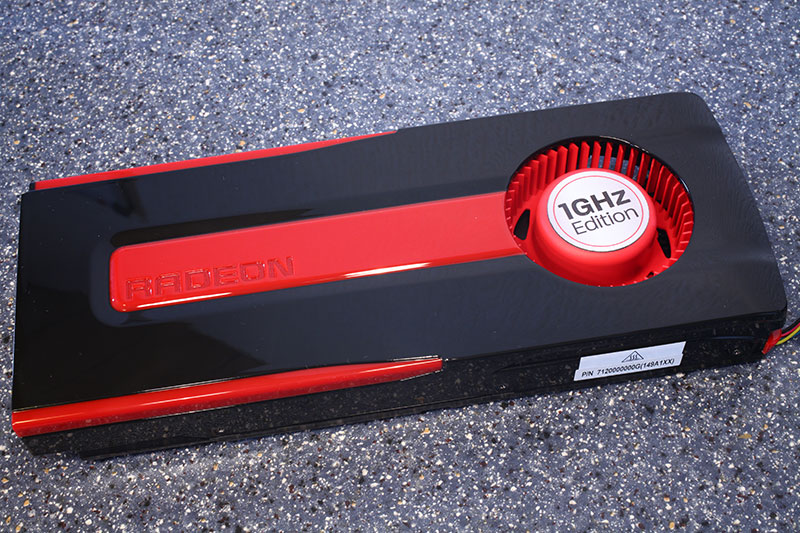
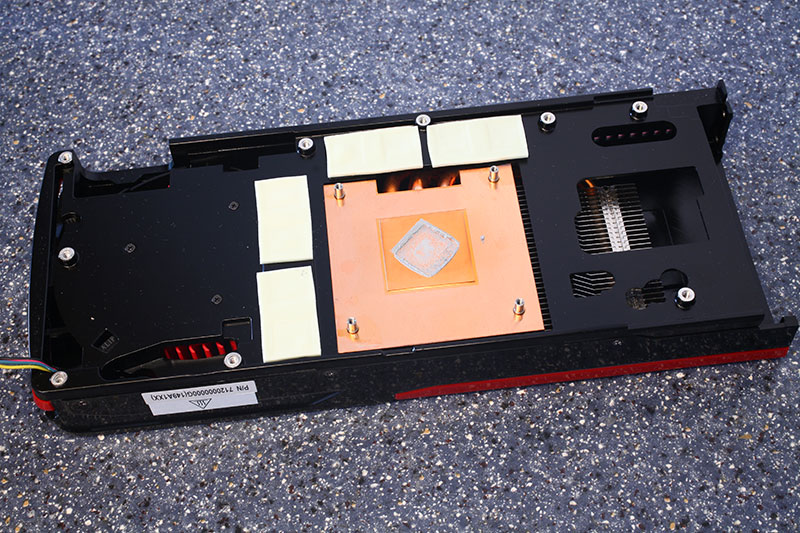
AMD's heatsink uses a central copper copper core and heatpipes to keep their card cool. You can also see the white pads that transport heat away from the memory chips.
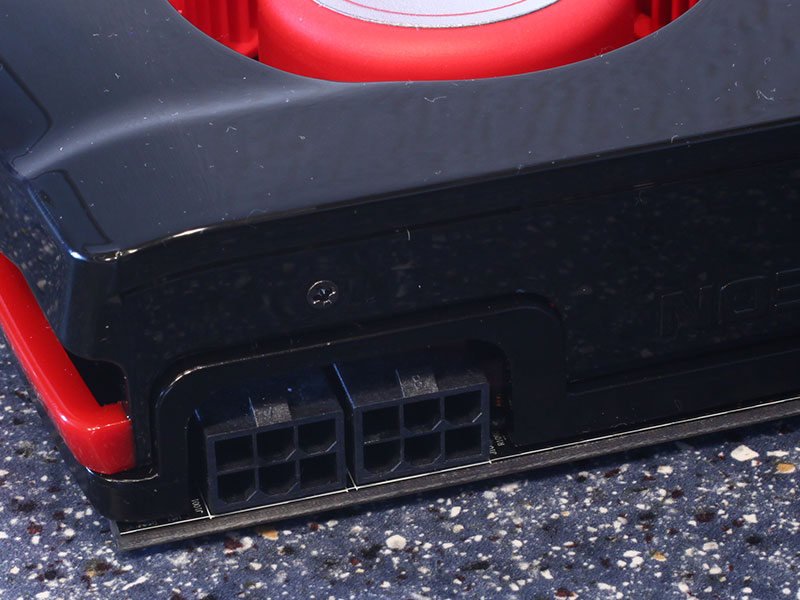
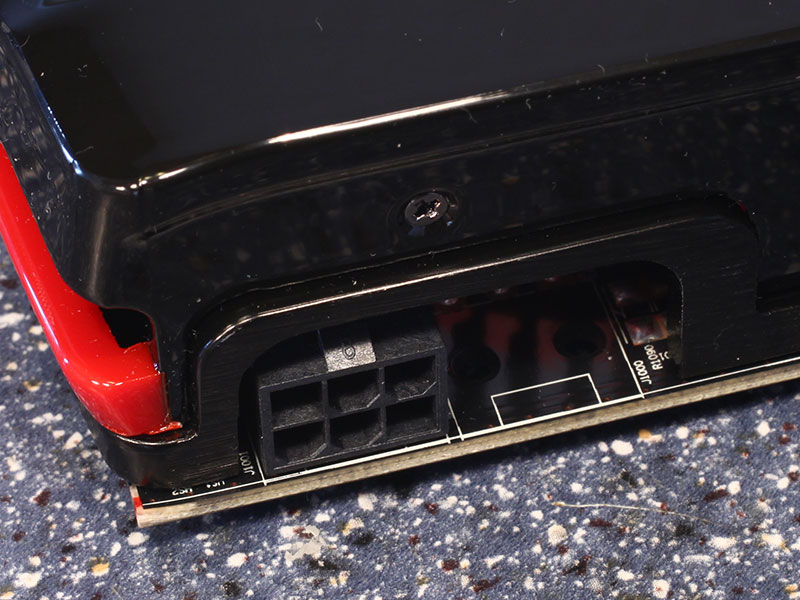
The HD 7870 requires two 6-pin PCI-Express power cables for operation, whereas there is only one 6-pin on the HD 7850. This power configuration is good for up to 225 W of power draw for the former and 150 W for the latter.
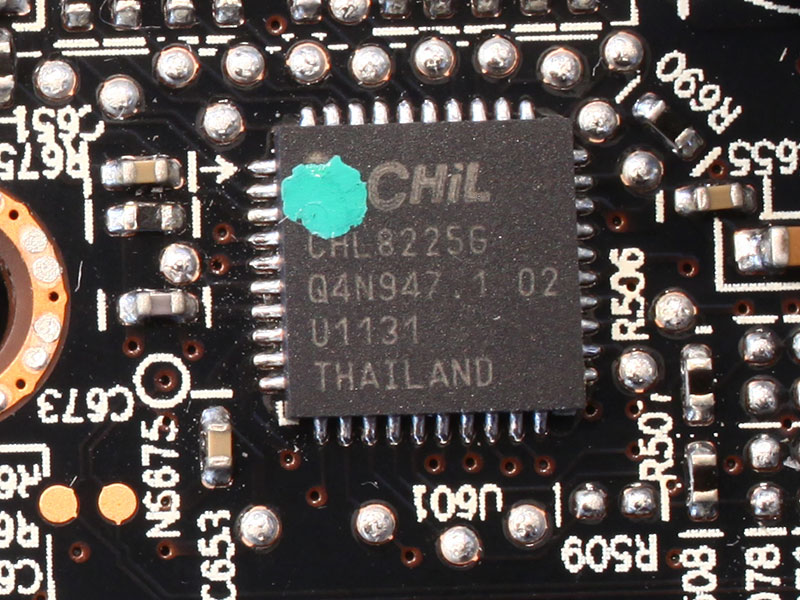
For voltage control both cards use the CHil CHL8225 controller, which is essentially the same as the CHL 8228 that's used on many high-end cards. It does offer extensive software voltage control and monitoring features and is well-supported by most overclocking software.
Retail HD 7850 boards will likely feature a lower cost voltage controller, like NCP5395 which has no software voltage control.
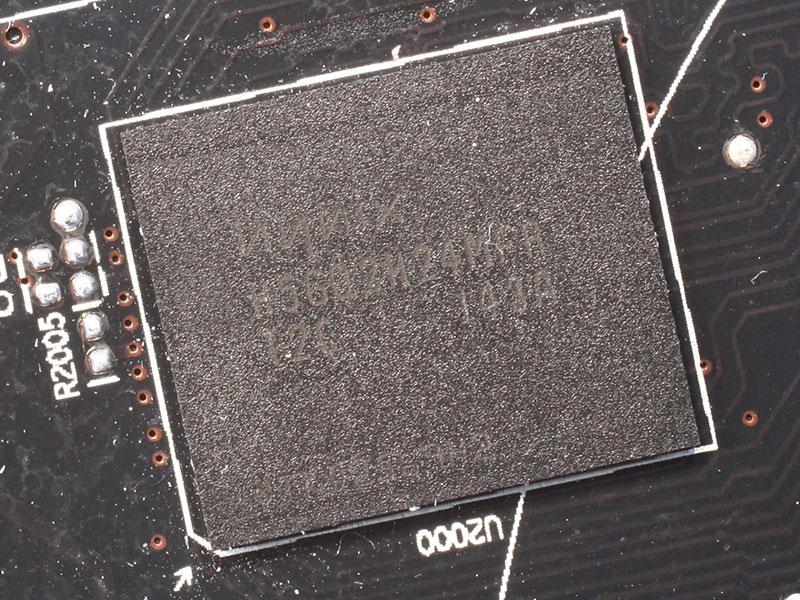
The GDDR5 memory chips are made by Hynix, and carry the model number H5GQ2H24MFR-T2C. They are specified to run at 1250 MHz (5000 MHz GDDR5 effective).
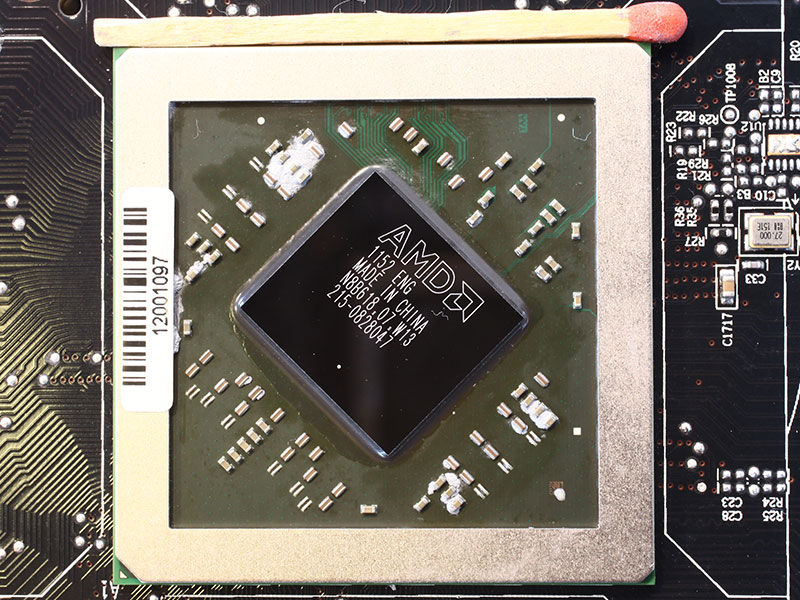
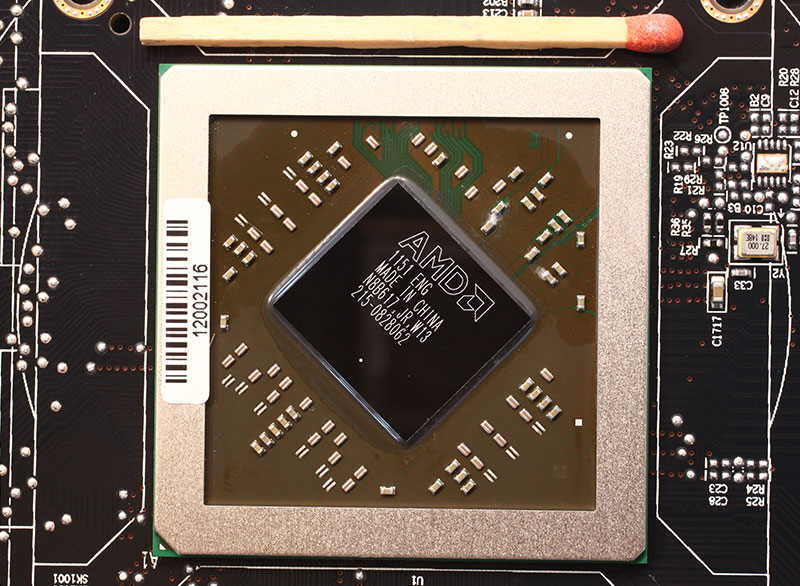
AMD's new Pitcairn graphics processor completes the AMD 28 nm GPU stack. It is produced on a 28 nm process at TSMC, with a transistor count of 2.8 billion. (HD 7850 GPU in the 2nd picture).
Test System
| Test System - VGA Rev. 16 | |
|---|---|
| CPU: | Intel Core i7 920 @ 3.8 GHz (Bloomfield, 8192 KB Cache) |
| Motherboard: | Gigabyte X58 Extreme Intel X58 & ICH10R |
| Memory: | 3x 2048 MB Mushkin Redline XP3-12800 DDR3 @ 1520 MHz 8-7-7-16 |
| Harddisk: | WD Caviar Blue WD5000AAKS 500 GB |
| Power Supply: | Antec HCP-1200 1200W |
| Software: | Windows 7 64-bit Service Pack 1 |
| Drivers: | NVIDIA: 285.62 ATI: Catalyst 11.12 HD 7950 & 7970: 8.921.2 RC11 HD 7750 & HD 7770: 8.932.2 HD 7850 & HD 7870: 8.95.5 |
| Display: | LG Flatron W3000H 30" 2560x1600 |
- All video card results were obtained on this exact system with the exact same configuration.
- All games were set to their highest quality setting unless indicated otherwise.
- AA and AF are applied via in-game settings, not via the driver's control panel.
- 1024 x 768, No Anti-aliasing. This is a standard resolution without demanding display settings.
- 1280 x 1024, 2x Anti-aliasing. Common resolution for most smaller flatscreens today (17" - 19"). A bit of eye candy turned on in the drivers.
- 1680 x 1050, 4x Anti-aliasing. Most common widescreen resolution on larger displays (19" - 22"). Very good looking driver graphics settings.
- 1920 x 1200, 4x Anti-aliasing. Typical widescreen resolution for large displays (22" - 26"). Very good looking driver graphics settings.
- 2560 x 1600, 4x Anti-aliasing. Highest possible resolution for commonly available displays (30"). Very good looking driver graphics settings.
Aliens vs. Predator
Aliens vs. Predator is based on a merger of the Aliens and the Predators franchise: two legendary alien species that are in conflict with each other, fighting to the death with human marines caught in between. The first person shooter game was developed by Rebellion Studios, who also developed the first AVP PC title and released in February 2010. It is one of the first DirectX 11 games with support for new features like tesselation, which is why AMD heavily promoted it at the time of their DX 11 card launches. We use the AVP benchmark utility with tesselation and advanced DX11 shadows enabled.
Batman: Arkham City
Batman is back on the LCD screen with Arkham City, a sequel to Batman: Arkham Asylum, by Rocksteady Games and WB. It was released to the PC platform in November. Batman is imprisoned in Arkham City, an infamous district of the DC Universe that contains the scum of Gotham, most of which Batman helped get in there. In order to get out he must go through scores of baddies, and encounter many of the iconic super-villains along the way. He's not entirely alone.
Batman Arkham City uses the same Unreal Engine by Epic, as Arkham Asylum, but thanks to the engine's modularity, it has been overhauled, outfitted with the latest technologies, including a graphics engine that takes advantage of DirectX 11.
Battlefield 3
Arguably the most anticipated online shooter title among real gamers - PC gamers, Battlefield 3 is the latest addition to some of the most engaging online multi-player shooter franchises. It combines infantry combat with mechanized warfare including transport vehicles, armored personnel carriers, main battle tanks, attack helicopters, combat aircraft, pretty much everything that goes into today's battlefields. The infantry combat is coupled with role-playing elements, which makes the experience all the more engaging. It also has a single-player campaign which added a few gigabytes to its installer.
Behind all this is a spanking new game engine by EA-DICE, Frostbite 2. It makes use of every possible feature DirectX 11 has to offer, including hardware tessellation, and new lighting effects, to deliver some of the most captivating visuals gamers ever had access to. Not playing this game on PC is grave injustice to what's in store. Faster PCs are rewarded with better visuals.
Hard Reset
Developed by Flying Wild Hog, a studio that prides itself with the fact that its creation is PC-exclusive (bless them), Hard Reset is a first person shooter that's set in a future cyberpunk setting of a dystopian world. It reintroduces many of the gameplay mechanics that made classics such as Quake wicked fun, which today's tactical military shooters eroded, creating a 'void' for.
The game uses the studio's in-house Road Hog Engine, which isn't particularly heavy on new-generation DirectX features, but can still get taxing with some GPUs.
Total War: Shogun 2
Set in 16th century feudal Japan, Total War: Shogun 2 takes the player on a quest for domination to conquer and unite the warlords of Japan. Moving away from the European setting of previous Total War games, the game is now designed around principles of the brilliant Chinese general Sun Tzu and his book "The Art of War". Gameplay is switched between real-time battles during which units on the battlefield are controlled and turn-based strategy which enable diplomacy, economy and production management. Taking control of a castles is comprised of several different stages which adds more complexity to warfare.
We benchmark using the highest settings in DirectX 11 mode, which was added via patch after release.
The Elder Scrolls: Skyrim
This isn't just a game, it's a masterpiece. A very large sandbox game that rejects the quality-quantity inverse-proportionality. By genre a role-playing game, TES: Skyrim combines some of the best elements of older titles in the franchise, with some new sandbox elements to churn out an extremely engaging, and addictive game. It makes use of Bethesda's Creation Engine, which isn't visually-intensive in that it doesn't use taxing graphics features, but the game's presentation itself, with large open worlds, end up taxing your hardware. Faster GPUs result in smoother gameplay with most eyecandy turned on.
3DMark 11
3DMark 11 is the very latest from the house of Futuremark, which has given out some of the most comprehensive benchmark applications for PC enthusiasts and gamers. 3DMark 11, as the name might probably suggest, makes use of Microsoft DirectX 11 API, and puts every feature at its disposal to use, creating astonishingly-realistic visuals. In the process, it evaluates DirectX 11 compliant GPUs, and lets gamers know what to expect from games from the near future that make use of the API, in terms of visual realism. The tessellation and depth of field tests are particularly of interest here.
Unigine Heaven 2.0
Unigine Heaven was one of the first demos that supported DirectX 11. Heaven is a technology demonstration for Unigine engine which supports DirectX 9 through 11 and OpenGL too. Version 2.0 adds more scenes and optionally more complex tesselation features. While there is some controversy surrounding the benchmark whether it is an accurate representation of what to expect from future games in regards to DirectX 11 we still chose it as test to get an insight into potential future gaming.
Power Consumption
Cooling modern video cards is becoming more and more difficult, especially when users are asking for quiet cooling solutions. That's why the engineers are now paying much more attention to power consumption of new video card designs. An optimized fan profile is also one of the few things that board vendors can do to impress with reference designs where they are prohibited to make changes to the thermal solution or components on the card.For this test we measure power consumption of only the graphics card, via PCI-Express power connector(s) and PCI-Express bus slot. A Keithley Integra 2700 with 6.5 digits is used for all measurements. Again, the values here reflect card only power consumption measured at DC VGA card inputs, not the whole system.
We chose Crysis 2 as a standard test representing typical 3D gaming usage because it offers: - very high power draw - high repeatability - is a current game that is supported on all cards due to its DirectX 9 nature - drivers are actively tested and optimized for it - supports all multi-GPU configurations - test runs a relatively short time and renders a non-static scene with variable complexity.
Our results are based on the following tests:
- Idle: Windows 7 Aero sitting at the desktop (1280x1024 32-bit) all windows closed, drivers installed. Card left to warm up in idle until power draw is stable.
- Multi-Monitor: Two monitors connected to the tested card, which use different display timings. Windows 7 Aero sitting at the desktop (1280x1024 32-bit) all windows closed, drivers installed. Card left to warm up in idle until power draw is stable.
- Average: Crysis 2 at 1920x1200, Extreme profile, representing a typical gaming power draw. Average of all readings (12 per second) while the benchmark was rendering (no title/loading screen).
- Peak: Crysis 2 at 1920x1200, Extreme profile, representing a typical gaming power draw. Highest single reading during the test.
- Maximum: Furmark Stability Test at 1280x1024, 0xAA. This results in a very high non-game power consumption that can typically be reached only with stress testing applications. Card left running stress test until power draw converged to a stable value. On cards with power limiting systems we will disable the power limiting system or configure it to the highest available setting - if possible. We will also use the highest single reading from a Furmark run which is obtained by measuring faster than when the power limit can kick in.
- Blu-ray Playback: Power DVD 9 Ultra is used at a resolution of 1920x1200 to play back the Batman: The Dark Knight disc with GPU acceleration turned on. Playback starts around timecode 1:19 which has the highest data rates on the BD with up to 40 Mb/s. Playback left running until power draw converged to a stable value.
In 3D, the power consumption is roughly identical when comparing absolute power draw numbers. Taking into account the increased 3D performance of the HD 7800 Series, results in leading performance per Watt scores. Only AMD's HD 7750 is more efficient, but also much slower.
Furmark maximum power has gone down since AMD has put their PowerTune technology in the cards, which detects overload situations and reduces performance accordingly to keep power consumption in check.
A new feature of the HD 7000 Series is AMD ZeroCore Power, which will power off the card as soon as the monitor output is blanked, during screen saver for example. For additional power and noise reduction the fan will stop in this state, too. We measured a power consumption of 1.11 Watts for the whole graphics card during ZeroCore Power. As soon as you move the mouse the PC is back immediately, there is no lag or any delay.
Please note that ZeroCore Power seems to engage only when the screen is completely static. If you have an application running that draws to the screen, the monitor will go black, but the card will not enter the low power state or return from it quickly. To avoid this, minimize all applications and let Windows sit at the desktop.
Fan Noise
In the past years users would accept everything just to get more performance. Nowadays this has changed and people have become more aware of the fan noise and power consumption of their graphic cards.In order to properly test the fan noise a card emits we are using a Bruel & Kjaer 2236 sound level meter (~$4,000) which has the measurement range and accuracy we are looking for.

The tested graphics card is installed in a system that is completely passively cooled. That is passive PSU, passive CPU cooler, passive cooling on the motherboard and a solid state drive.
This setup allows us to eliminate secondary noise sources and test only the video card. To be more compliant with standards like DIN 45635 (we are not claiming to be fully DIN 45635 certified) the measurement is conducted at 100 cm distance and 160 cm over the floor. The ambient background noise level in the room is well below 20 dbA for all measurements. Please note that the dbA scale is not linear, it is logarithmic. 40 dbA is not twice as loud as 20 dbA. A 3 dbA increase results in double the sound pressure. The human hearing is a bit different and it is generally accepted that a 10 dbA increase doubles the perceived sound level. The 3D load noise levels are tested with a stressful game, not Furmark.
Noise levels are far from impressive. I would have expected much better, especially in idle, considering the reduced heat outputs of the new cards.
Under load, noise is similar to what we have seen from previous generation cards - no significant improvements here either.
Generally AMD reference design cards have more noisy coolers than custom AIB designs, so there is still some hope.
Performance Summary
The graphs on this page show a combined performance summary of all tests and resolutions from previous pages. Each graph shows the tested card as 100% and all other cards' performance relative to it. A sixth graph summarizes all tests in all resolutions to calculate the total relative performance of the review sample. Performance per Watt
Using the relative performance scores from the previous page and the typical gaming power consumption result, the following graphs show efficiency of the cards in our test group. Performance per Dollar
If you are looking for the best bang for the buck, then you will love this graph. We looked up the current USD price of each card on the popular online shop Newegg and used it and the relative performance numbers to calculate the Performance per Dollar Index. Overclocking
The overclocks listed in this section were achieved with the default fan and voltage settings as defined in the VGA BIOS. Please note that every single sample overclocks differently, that's why our results here can only serve as a guideline for what you can expect from your card. HD 7870 (1st picture): Maximum stable clocks of the card are 1205 MHz core (21% overclock) and 1520 MHz Memory (27% overclock).
Outstanding results! 1205 MHz GPU clock is actually the highest clock we have seen on any graphics card tested so far. Memory overclock well, too, to the typical levels for these chips.
The HD 7850 overclocks a bit worse than the HD 7870 in terms of maximum clock speed, but that is to be expected from a lower-grade GPU. Maximum clocks are 1140 MHz (+33%) and 1580 MHz (+32%).
Overclocked Performance
Using these clock frequencies we ran a quick test of Call of Duty 4 to evaluate the gains from overclocking.Actual 3D performance gained from overclocking is 18.7% (HD 7850) and 18.5% (HD 7870).
Temperatures
Temperatures are low, I would have preferred less noise for slightly higher temperatures.
Clock Profiles
Modern graphics cards have several clock profiles that are selected to balance power draw and performance requirements.The following table lists the clock settings for important performance scenarios and the GPU voltage that we measured. We measure on the pins of a coil or capacitor near the GPU voltage regulator.
HD 7870
| Core Clock | Memory Clock | GPU Voltage (measured) | |
|---|---|---|---|
| Desktop | 300 MHz | 150 MHz | 0.83 V |
| Multi-Monitor | 300 MHz | 1200 MHz | 0.90 V |
| Blu-ray Playback | 1000 MHz | 1200 MHz | 1.23 V |
| 3D Load | 1000 MHz | 1200 MHz | 1.24 V |
| CCC Overdrive Limits | |
|---|---|
| Core | 1400 MHz |
| Memory | 1450 MHz |
HD 7850
| Core Clock | Memory Clock | GPU Voltage (measured) | |
|---|---|---|---|
| Desktop | 300 MHz | 150 MHz | 0.83 V |
| Multi-Monitor | 300 MHz | 1200 MHz | 0.91 V |
| Blu-ray Playback | 860 MHz | 1200 MHz | 1.23 V |
| 3D Load | 860 MHz | 1200 MHz | 1.24 V |
| CCC Overdrive Limits | |
|---|---|
| Core | 1050 MHz |
| Memory | 1450 MHz |
Value and Conclusion
 |
|
|---|---|
 | HD 7870
|
 |
|
| 9.1 |  |
| HD 7850
|
|
|
| 8.6 |  |
ConclusionAMD's new Pitcairn GPU completes the company's 28 nanometer GPU lineup. Today we see two cards introduced using this graphics processor, which are positioned in the sweet spot money maker segment around $300.We combined both the Radeon HD 7850 and HD 7870 in one review today, as there are too few differences between them to warrant separate reviews. Both cards offer significant performance gains over their previous generation predecessors, up to 40% on the HD 7850, which is well beyond what we have seen on other recent launches. Prices were increased too; it seems AMD wants to position the HD 7800 Series back in the upper performance segment, where HD 5800 series was. HD 6800 Series often didn't provide enough performance for serious gamers at HD resolutions. Overall I'm very happy with what the new cards bring to the table. Gaming performance is sufficient for all titles; power consumption is at record low levels, like on the other HD 7000 Series cards; all essential non-gaming features are included and the cards overclock like champs. Actually the HD 7870 claimed a new record spot for maximum GPU clock in a TechPowerUp VGA review with 1205 MHz. This enables willing users to get some free extra performance from their card, basically bumping it up to the next faster card according to our testing. Noise levels were a bit dissapointing. It seems AMD has favoured low temperatures over reduced noise levels too much, which resulted in noise levels that are higher than what I expect from a brand-new card that is packed with power consumption reduction features. Price-wise, we've almost gotten used to AMD charging first-to-market premiums for their HD 7000 Series. In my opinion, the HD 7870 is $30 too expensive, and the HD 7850 would do much better if it were $10 cheaper. In terms of increasing budget, the following cards are great choices. At the lower end of the price range sits NVIDIA's $210 GTX 560 Ti, which offers best in-class performance per Dollar. My next more expensive choice would be HD 7850 at $250, possibly get a custom overclocked version. With $300 to spend the choice gets a bit difficult as there is no real "star" product at this price point. Maybe a used GTX 570 or the GTX 560 Ti 448 Cores. Once we reach $330, GTX 570 becomes a rock-solid choice, unless you are willing to dish out $20 more for AMD's Radeon HD 7870 which does offer much better power consumption than the NVIDIA card. So there you have it, right now there's a good choice at almost every price point, and we haven't seen what NVIDIA's Kepler GK104 can do! |


